β release · OSS (MIT)

Know your AI coding budget — before month-end.

Local-only, one command.See your Claude Code costs and usage — right on your machine.

koji-lens summary --since 30d
$ koji-lens summary --since 30d
koji-lens — analyzed 412 sessions
period: last 30d
==============================
TOTAL
sessions: 412
cost: $874.12
models: claude-opus-4-7×1562, claude-sonnet-4-6×60
note: API-rate equivalent
$npm install -g @kojihq/lens
  • 01How much did Claude Code cost you this month?
  • 02What was your biggest cost day, and what were you building?
  • 03Which tool calls are burning the most tokens?

koji-lens parses the Claude Code session logs stored locally on your machine and visualizes how you actually use AI coding — in a single command.

$ koji-lens summary --since 30d
TOTAL
sessions: 412
cost: $874.12 (¥135K)
top tools: Read×523, Bash×412, Edit×287, ...

Two ways to use it

Two different pictures of the same command — depending on how you pay for Claude Code.

Claude Pro / Max subscriber

See what your $20 / $200 subscription is really worth.

You pay a flat $20/month for Pro (or $200 for Max). But are you using it like a $20 subscription, or like a $500 one? Anthropic doesn't show the answer anywhere.

$ koji-lens summary --since 30d
TOTAL
cost: $874.12 (API-equivalent)
models: claude-opus-4-7×1562, claude-sonnet-4-6×60
note: API-rate equivalent.
Subscribers pay a flat fee regardless.

That $874.12 is what 30 days of usage would have cost on the API. If you're a $20/month Pro user, you just got 40× your subscription back. That's information you can't get from the Claude Code dashboard or the Anthropic Console — only from your local logs.
API token-based user

Catch overspend before month-end.

You pay per token via the API. You suspect Claude Code is burning through Opus on tasks Sonnet could handle, but you want numbers, not hunches.

$ koji-lens summary --since 7d
TOTAL
cost: $187.45
cost by model:
claude-opus-4-7 $173.21 (92%)
claude-sonnet-4-6 $14.24 ( 8%)

Now you have evidence: 92% of your spend is Opus. Switch the easy turns to Sonnet, run the same command next week, and see the difference — improvement based on numbers, not intuition.

What you'll see in the first minute

One terminal command to grasp how your AI coding actually plays out.

How much you spent this month

Per-session cost in USD with a TOTAL aggregate. Reconciles cleanly against your end-of-month Anthropic bill.

Which work cost you the most

Cost trends over the last 7 / 30 days plus the top sessions. Drill into outlier sessions in one click.

Per-tool breakdown in one command

`koji-lens tools` shows Bash / Read / Edit / Write / MCP invocations with percentage + bar chart. Instantly see which tool drove cost over the period.

Always-visible state via statusline

First-class Claude Code statusLine integration. Usage trend (💚 sub value up / 💧 under-utilized for Pro/Max default, or 💚 saved / 🚨 cost up for api mode), cache hit rate (💎), agent state (⚡/💤/🛑), and audit anomalies (🛡/⚠) on a single line. Subscription default example: 💚 ↑60% vs last month │ $30 more usage │ sub value up │ 💎 78% cache (Pro/Max getting your money's worth + 78% cache hit rate). API users can switch via `koji-lens config set billing-mode api`.

Audit log, -79% faster — make weekly review a habit

Just run `koji-lens audit` and it automatically classifies file writes, external calls, and MCP invocations. PII is redacted by default. Repeat runs come back -79% faster, so a 5-minute weekend review actually sticks.

A koji mascot fermenting in your statusline

Opt-in `--buddy` adds a koji-themed companion. Levels 1-10 by total session count (~3 years to Max), 50 sayings across 5 states. `--buddy-only` for a buddy-only display.

Your data stays on your machine, always

No cloud uploads. Prompt bodies are never written to SQLite. Safe to analyze your full log history.

Runs on Windows / macOS / Linux

Node.js 22+ CLI with built-in `koji-lens hook` (no per-OS shell scripts needed). `--buddy-locale en` switches sayings to English.

How koji-lens compares to /usage

Comparison against the Claude Code /usage command and Anthropic Console.

Time range aggregation
Official (/usage / Anthropic Console)
24h / week (fixed)
koji-lens
--since with 24h / 7d / 30d / arbitrary ISO date
Cross-cut by project / model / tool / subagent
Official (/usage / Anthropic Console)
✗
koji-lens
✓ (aggregates by path, model, tool name, parent-child structure)
Cost visibility for subscribers
Official (/usage / Anthropic Console)
Usage only, no cost numbers
koji-lens
Shows API-equivalent cost as reference (with note)
Local-only (no data leaves your machine)
Official (/usage / Anthropic Console)
Console / dashboard goes through the cloud
koji-lens
✓ (parses JSONL locally, Free tier permanent)
JSON / CSV / Markdown export
Official (/usage / Anthropic Console)
✗
koji-lens
--format json / --summary-only / `koji-lens export --format markdown` for paste-ready tables on Zenn / HN / blog posts (CSV / JSON via the same command)
Statusline integration + koji mascot
Official (/usage / Anthropic Console)
✗
koji-lens
`koji-lens statusline` for a one-line view, `--buddy` for the Lv1-10 evolving koji mascot, `--mode minimal | normal | detailed` for density control
tool_use audit log
Official (/usage / Anthropic Console)
✗
koji-lens
`koji-lens audit` extracts tool_use events into 7 categories (fs-read / fs-write / exec / fetch / task / mcp / other). PII (15 types: email, phone, API keys, Bearer tokens, cards, UUIDs, JWTs, AWS keys, GitHub tokens, Webhook URLs, etc.) auto-redacted by default. Anomaly detection in statusline for new MCP servers, high-frequency exec, or sensitive file writes.

The official /usage ships in v2.1.105+. Anthropic Console shows monthly billed totals for API users. koji-lens reads the JSONL files Claude Code already writes to ~/.claude/projects/ — fully local, no data leaves your machine. Aggregation, audit log, and statusline are bundled in a single CLI.

Drill down to individual sessions

koji-lens sessions lists individual sessions so you can spot outliers instantly. The same data is also viewable in the browser.

koji-lens sessions --since 24h --limit 5
$ koji-lens sessions --since 24h --limit 5
055a662d-... 8m 58s $9.63
44c29745-... 1h 7m 33s $32.75
28cf16fa-... 7h 38m 22s $420.66 ← outlier
agent-a94b... 1m 9s $0.29 ↳ subagent
22a919c7-... 12m 4s $20.7381
... (10 more)
# To see charts:
$ koji-lens serve
→ http://localhost:3210

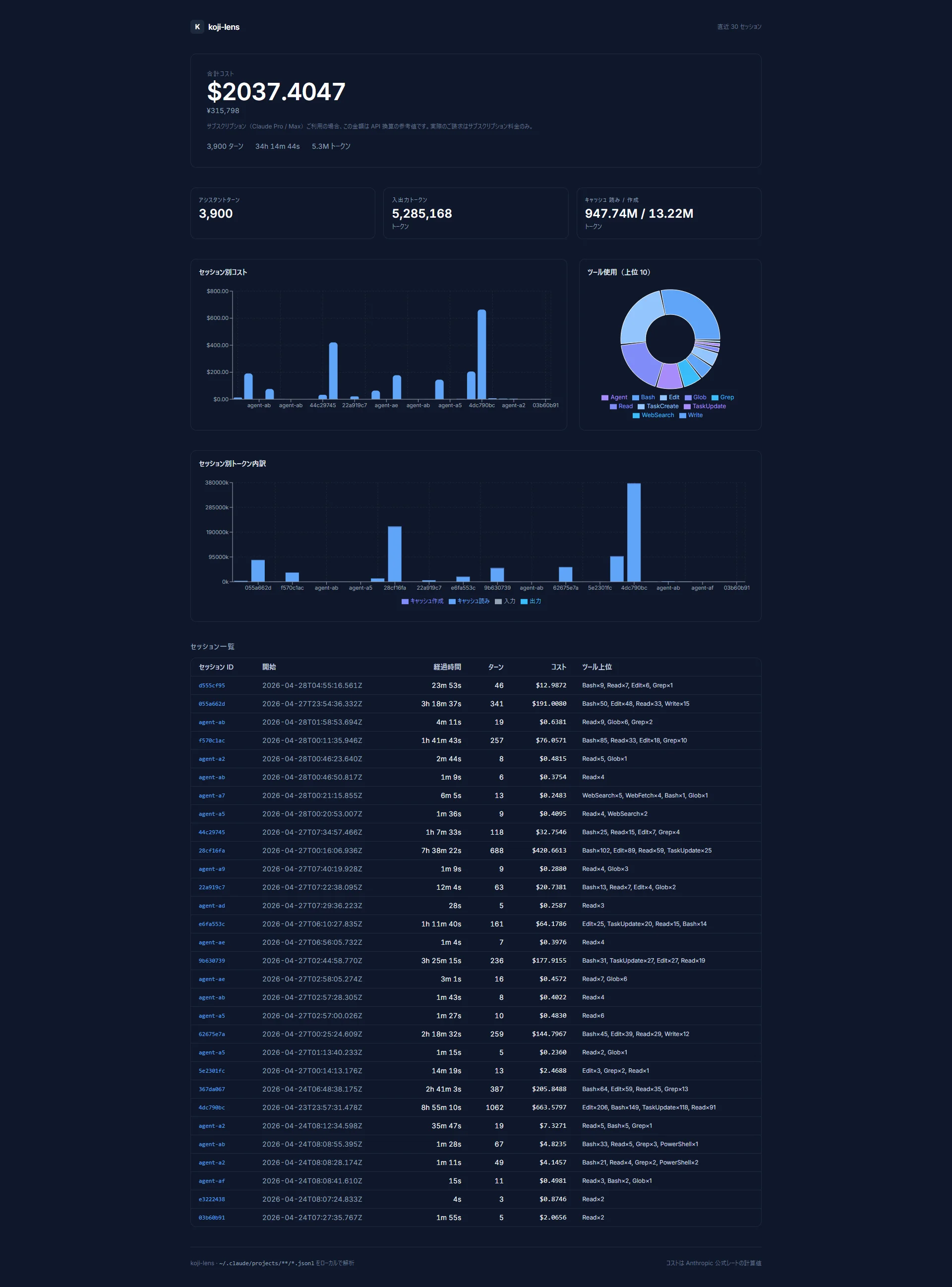
The same data, in a browser.

Run koji-lens serve to launch a local web dashboard. The full picture in one screen, with charts and aggregate numbers.

http://localhost:3210
koji-lens web dashboard — total cost, KPI cards, per-session cost and tool usage charts in a single view
Screenshot from real data (last 30 sessions aggregated)

Get started in 3 steps

If you're already using Claude Code, it works out of the box — no extra setup.

  1. 1Install
    $npm install -g @kojihq/lens
  2. 2See your session summary
    $koji-lens summary
  3. 3Launch the dashboard
    $koji-lens dashboard

Run koji-lens --help — there's a "Quick Start (try these 3 commands first)" guide right at the top.

💡 You can also use the shorter alias lens (e.g. lens summary).